
Inside Wallets, Maxio’s Prepaid Balance Layer




Selling prepaid is the easy part. A customer buys 500,000 API credits, you take the money, everyone’s happy. A week later, a CS rep gets the email: how many do we have left?
Most teams answer it with a spreadsheet, a support ticket, and a person who remembers to check. That holds until a balance expires unnoticed and a renewal slips.
Wallets is now live in Maxio, and it answers that question for you, inside the same subscription that already handles your billing.
What Wallets does
Wallets tracks prepaid balances, in dollars, credits, tokens, or any unit you sell, on a ledger that updates as usage is recorded. It runs directly in Maxio so the balance funds itself when a subscription goes live and depletes as usage is reported.
How Wallets works, step by step
Say you run an AI platform and you sell a plan called Scale: 500,000 inference tokens a month, unused tokens roll over to the next month, and anything past the allowance bills as overage. A customer signs up on the first of the month.
1. Set it up in the catalog
You set the wallet up once, in the catalog, before anyone buys anything.
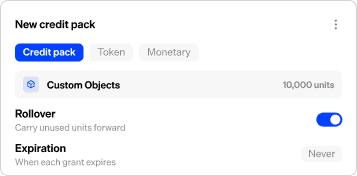
Add a token type, inference tokens, and attach it to the Scale plan. Then set the rules that govern it: how much the plan grants each period, whether unused tokens roll over and by how much, when they expire, and what happens when the balance hits zero. This is catalog work. A product, RevOps, or finance person can do it without filing an engineering ticket. If you launch a second token type next quarter, like image credits priced differently, that is another catalog entry, not another development cycle.
Each credit type gets its own rules. Your Scale plan can carry unused tokens into the next month, a promotional grant can expire at month-end, and an enterprise pool can never expire at all. One policy does not have to cover every deal.
2. Fund the wallet automatically
Your customer’s subscription goes live on the first. The wallet funds itself the moment it does, granting 500,000 tokens against the Scale plan’s entitlement. Nobody keys it in.
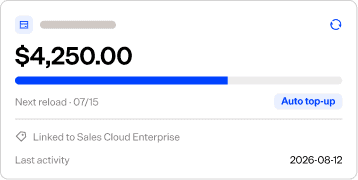
From there it refills on the entitlement’s schedule. The first of next month grants another 500,000 and applies the rollover rule you set. If the customer wants more mid-month, a top-up pack stacks onto the existing balance, and an automatic top-up can buy more balance when it drops below a threshold you set, so a heavy user stays funded without anyone stepping in. A manual grant covers the times a CS or finance person needs to correct a balance by hand.
Every funding event feeds the same ledger.
3. Draw the balance down
Now the customer consumes. Every inference call their product makes reports a usage event, and each event draws the balance down.
Usage arrives two ways. Connect a meter and usage events flow into the wallet automatically, with no one entering them by hand. Or record usage by manual entry or a batch, and it posts to the same ledger. The balance is always what was granted minus what was consumed.
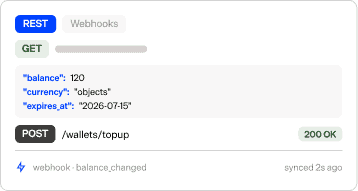
Reading it is one API call. Your product, your CS dashboard, and your internal tools ask for the current balance and get an answer. If you would rather not poll, subscribe to a webhook to get notified when the balance changes. This is what answers “how much do they have left” in code instead of a spreadsheet.
4. Alert on a low balance
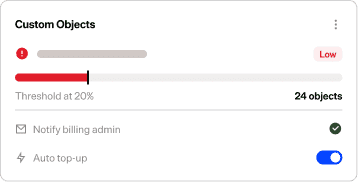
Your customer is burning tokens faster than expected. Halfway through the month they are at 20% remaining.
You set an alert threshold when you configured the wallet, so your team gets notified before the balance runs out. A customer at 20% is one you can reach with a top-up, an upgrade, or a bigger plan while they are still using the product, instead of finding out at renewal that they went quiet.
5. Handle the zero balance
The customer keeps going and hits zero. Now the wallet does whatever you configured. You pick one of three settings for each wallet:
- Hard stop. The balance stops at zero and Wallets marks the wallet empty. Your product reads the wallet balance and blocks the next API call.
- Overage. Usage past zero bills automatically, in arrears, at a rate you set. For example, on the Scale plan, that could mean 500,000 tokens included and a fraction of a cent for every token after, so a heavy user keeps paying for what they consume past the allowance.
- Auto top-up. When the balance drops to a threshold you set, the wallet buys more automatically so the customer’s usage continues without a gap. If the top-up charge fails, the wallet follows the fallback you choose, such as a hard stop.
Because this is set per wallet, a free trial can hard stop, a self-serve plan can bill overage, and an enterprise account can refill itself, all from one catalog.
Every entry on one ledger
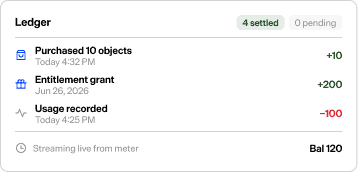
Every grant, refill, top-up, drawdown, correction, and expiration posts to one ledger. and no entry can be edited or deleted. The balance is not a figure someone maintains by hand. It is the running sum of a complete, ordered record of everything that ever happened to the wallet.
CS can quote a balance with confidence, and a correction six months from now still has a paper trail. Sales, CS, finance, and the customer’s own product all read the same record.
Where Wallets fits in Maxio’s monetization stack
Metering captures the usage events. Entitlements defines what each customer can access and how much they are granted. Wallets is the third layer of Maxio’s monetization stack, and tracks how much of each customer’s prepaid balance is left. With all three live, they connect what a customer bought, what they can use right now, and how much they have left, on a single subscription. A prepaid pricing model runs end to end on that, instead of breaking in a spreadsheet or across systems that never quite reconcile.
Building toward prepaid, credit, or token pricing, or running one that has outgrown its spreadsheet? Book a demo at maxio.com/wallets.
Related Content