6 Best Financial Reporting Tools in 2026



Managing financial health requires accurate data and reliable reporting. As companies grow, spreadsheets and manual exports slow down the close and make it harder to share trusted numbers. Financial reporting software connects to your accounting system, ERP, payroll, and billing tools to pull data automatically and produce consistent statements and dashboards.
This guide compares six financial reporting tools for 2026, including what each tool is best for, key features, pricing, and trade-offs.
Key takeaways
- Financial reporting software pulls data from systems like accounting, ERP, payroll, and billing tools to create consistent statements, dashboards, and KPIs.
- The biggest value is speed and accuracy: automated consolidation and validation reduce spreadsheet work, manual errors, and last-minute fixes during close.
- The best tools connect easily to your existing stack, support custom report templates, and include audit trails, version control, and approval workflows.
- The right platform depends on fit: general accounting tools work for basic statements, while subscription and multi-entity businesses need deeper revenue and consolidation features.
- When comparing options, look at total cost and effort, including implementation time, ongoing admin needs, and trade-offs in flexibility or reporting depth.
What is financial reporting software?
Financial reporting software helps a business turn accounting and operational data into clear financial statements and reports. It connects to systems like your general ledgers, invoicing systems, payroll platforms, bank feeds, and ERP systems to extract transaction data and format it into standardized reports.
Most reporting tools generate statements and support custom reporting for budgets, profitability, and key financial metric KPIs. Because the data is connected and consistent, teams can compare results month over month or quarter over quarter without rebuilding spreadsheets.
At a basic level, the goal is simple: give finance teams a reliable way to produce accurate reports faster, with fewer last-minute fixes and fewer opportunities for errors.
Benefits of financial reporting software
Financial reporting solutions address common pain points in the close process while giving finance teams better tools to support informed decisions. Here’s how the right platform can improve your operations:
Streamlinefinancial data consolidation
Financial reporting software pulls data from multiple sources into a single platform, eliminating the need to manually gather information from different systems. This centralized approach supports invoice consolidation and gives you a unified view of your financial position, making it easier to analyze performance across departments, products, or regions.
Make data-driven decisionswith real-time insights
Access to current financial data means you can respond quickly to market changes and internal trends. Real-time dashboards and customizable reports deliver deeper insights so you can spot opportunities, drill down into issues as they emerge, and optimize financial performance.
Enhance accuracy and reduce manual errors
Automated data entry and built-in validation rules catch mistakes that typically slip through spreadsheet-based processes. The software performs calculations consistently and maintains an audit trail of all changes, reducing the risk of errors that can lead to costly corrections or compliance issues.
Saves time with automated reporting workflows
Templates and scheduled reports eliminate repetitive tasks that once consumed hours of your team’s time. Instead of rebuilding the same reports each period, you can configure them once and let your automated billing software generate updated versions automatically, freeing your staff to focus on analysis rather than data compilation.
Strengthen compliance and audit readiness
Built-in controls and documentation features help you maintain the records and processes required by regulatory standards. Reporting software tracks who accessed or modified financial data, stores supporting documentation alongside reports, and ensures calculations follow established accounting principles to support revenue recognition.
Key features to look for in financial reporting software
Not all financial reporting platforms offer the same capabilities. The features that matter most depend on your company’s size, industry, and reporting requirements.
When evaluating options, you should focus on features that address your specific reporting challenges. The following capabilities represent the core functionalities that deliver the most value for growing businesses:
- Multi-source data integration: The software should connect directly to your other business applications to pull financial data automatically. This eliminates manual data transfers and keeps your reports current.
- Customizable report templates: Look for the ability to create and save report formats that match your specific needs. Templates save time during setup, while customization options let you adapt reports as requirements change.
- Version control and audit trails: Software should track every change to financial data, including who made it and when. This documentation supports financial audits and helps troubleshoot discrepancies.
- Collaborative review workflows: The ability to route reports through approval chains keeps everyone aligned during the close process. Built-in collaboration reduces email back-and-forth and prevents confusion about current versions.
- Data visualization and dashboards: Interactive charts and graphs make financial data more accessible to non-finance stakeholders. Visual formats help executives quickly grasp performance.
- Flexible export and sharing options: The platform should let you export reports in multiple formats and share them securely with stakeholders. This ensures everyone can access information in their preferred format.
Top 6 financial reporting tools in 2026
1. Maxio
Ideal for
B2B companies with subscription billing, AI monetization strategies or complex revenue recognition needs.
Overview
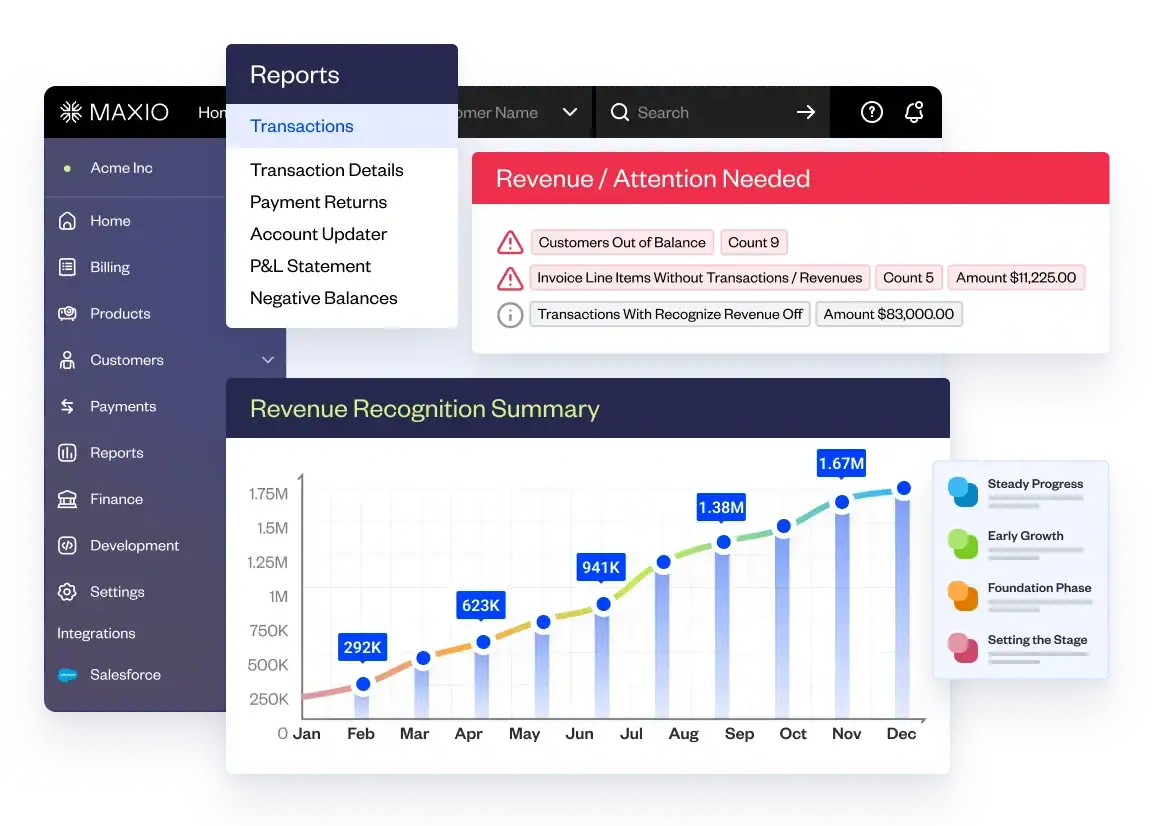
Maxio is an all-in-one platform purpose-built for B2B SaaS financial operations. The platform combines subscription billing with revenue recognition and real-time reporting in one system. You get investor-grade analytics with over 30 pre-built reports covering ARR, MRR, churn, and LTV. Maxio automatically categorizes revenue into New, Expansion, Contraction, and Churn while handling mid-month changes and multi-year contracts. Finance teams close books faster while maintaining full audit readiness for GAAP and ASC 606 compliance.
Pros
- Built-in subscription billing removes the need for separate invoicing tools
- Pre-built SaaS metrics dashboards generate investor-ready reports automatically
- Automated revenue recognition ensures ASC 606 compliance for multi-year contracts and usage-based pricing
Cons
- Designed for B2B companies, so other business models may need different solutions
- Enterprise-grade pricing may exceed budgets for very early-stage startups
2. QuickBooksOnline
Ideal for
Small businesses and early-stage companies that want simple financial reporting.
Overview
QuickBooks Online handles baseline financial reporting with income statements, balance sheets, and cash flow statements. The platform is widely adopted across small businesses, which makes it easy to find accountants and bookkeepers who already know the system. It works well for standard accounting tasks but lacks native support for subscription metrics or automated revenue recognition. QuickBooks offers a familiar interface and affordable pricing tiers that appeal to early-stage companies with straightforward reporting needs.
Pros
- Accountants and bookkeepers typically already know how to use QuickBooks
- Affordable pricing works for businesses with basic reporting needs
- App marketplace offers add-ons for payroll, inventory, and time tracking
Cons
- No built-in SaaS-specific metrics like ARR, churn rate, or cohort analysis
- Subscription revenue recognition requires workarounds or third-party tools
- Report customization becomes difficult as business models grow more complex
Integration with Maxio
QuickBooks Online connects directly to Maxio to automate journal entries and reduce month-end reconciliation work. The integration offers:
- Automated Chart of Accounts syncing from QuickBooks to Maxio
- Consolidated journal entries that flow from Maxio into QuickBooks at month-end
- Linkbacks between systems for quick audit trail navigation
3. Xero
Ideal for
Small to medium-sized businesses that need cloud-based accounting with strong bank reconciliation and international capabilities.
Overview
Xero is a cloud accounting platform that covers the basics like bank reconciliation, invoicing, and expense tracking. It connects with thousands of banks and supports multiple currencies on higher-tier plans for international businesses. All plans include unlimited users, which is helpful for growing teams. Reporting is flexible with standard templates (P&L, balance sheet, cash flow), but SaaS metrics like ARR or customer churn typically require third-party tools.
Pros
- Unlimited users on all plans accommodate growing teams
- Automated bank reconciliation and transaction matching reduce manual data entry
- Over 1,000 app integrations extend functionality for specific needs
Cons
- Multi-currency support and advanced features require the highest-tier Established plan
- No native subscription billing or automated revenue recognition for SaaS companies
- Customer support responsiveness varies according to user reviews
Integration with Maxio
Xero connects directly to Maxio to sync billing and revenue data between platforms. The integration offers:
- Automated syncing of customer contacts, invoices, and SaaS payments from Maxio to Xero
- Configurable sync frequency: hourly, every 4 hours, or nightly
- Revenue and liability account mapping ensures transactions post to the correct accounts in Xero
4. Vena Solutions
Ideal for
Mid-sized to enterprise companies with complex FP&A needs and finance teams heavily invested in Excel workflows.
Overview
Vena Solutions is an FP&A platform for financial planning, financial analysis, and reporting that works inside of Excel. It pulls data from tools like ERP, CRM, and HR systems, then adds controls Excel doesn’t have on its own, like version control and workflow approvals. Vena makes it so that teams can build custom reports and run what-if scenarios without leaving Excel. It also includes Vena Copilot, an AI assistant that answers finance questions using natural language.
Pros
- Excel-native interface is easy for finance professionals familiar with spreadsheets
- Pre-built templates and industry-specific solutions speed up setup
- Workflow management includes audit trails that track changes and improve accountability
Cons
- High pricing and implementation fees make it less suitable for smaller businesses
- Performance slows when working with large datasets or complex models
- Implementation often takes 3-6 months and requires dedicated resources and external consultants
5. OracleNetSuite
Ideal for
Mid-sized to enterprise companies needing a comprehensive ERP system with integrated financial management, inventory, and CRM capabilities.
Overview
Oracle NetSuite is a cloud-based ERP that brings together financials, inventory, and supply chain tools in one system. It supports core accounting and multi-subsidiary consolidation with multi-currency features for global teams. You also get customizable reports and role-based dashboards so you can track results by division, territory, or product. It’s built for companies that need a central system to run complex operations, not just bookkeeping. NetSuite Planning and Budgeting adds AI-powered forecasting and scenario planning.
Pros
- ERP functionality consolidates multiple business systems into one platform
- Multi-book accounting supports different reporting standards and tax codes
- Multi-entity and multi-currency capabilities benefit international companies
Cons
- High upfront costs with implementation fees often 2-3x the annual license cost
- Complex setup requires specialized consultants and typically takes 4-6 months
Integration with Maxio
NetSuite integrates bidirectionally with Maxio to automate subscription billing and revenue recognition. The integration offers:
- Automated syncing of customers, invoices, credit memos, payments, and refunds between systems
- Maxio handles billing while NetSuite manages the general ledger and entity-level reporting
- Real-time data flow eliminates manual entry and reduces implementation time
6. Datarails
Ideal for
Small to mid-sized finance teams that rely heavily on Excel and want to automate FP&A processes without changing their workflow.
Overview
Datarails is an Excel-native FP&A platform that automates budgeting and reporting while letting finance teams stay in their existing spreadsheets. It connects to ERP and accounting tools to pull data into Excel models automatically, reducing manual copy-paste work. Datarails also adds version control and workflow approvals, so teams don’t have to rebuild their models in a new system. It includes FP&A Genius, an AI assistant that answers finance questions, surfaces insights, and can generate presentation-ready reports.
Pros
- Excel-native interface lets finance teams use familiar spreadsheets with added automation
- AI-powered chatbot answers questions about financial data without manual analysis
- Automatic data consolidation from multiple sources with real-time updates
Cons
- Works only with Excel, not Google Sheets
- Complex formulas can break when users without licenses edit models
How to choose the right financial reporting toolfor your business
Selecting the appropriate financial reporting tool depends on your company’s size, business model, and complexity of reporting. The software suitable for an early-stage startup may not fit a B2B SaaS company with multi-year contracts and intricate revenue recognition requirements.
Begin by assessing these factors:
- Business model fit: If you’re running a subscription-based business, focus on tools that have built-in support for recurring revenue and SaaS metrics like ARR and MRR. Basic accounting platforms can handle simple reporting, but often need workarounds for subscription-specific needs.
- Current system compatibility: Seek software that easily connects with your existing technology stack. The most effective reporting tools integrate with your ERP, CRM, and payment processors to avoid manual data entry.
- Scalability needs: Think about where your business will be in two years. Software effective for 10 employees might become a bottleneck at 50. Pick a platform that can scale with your transaction volume and reporting needs.
- Team skills and resources: Consider your finance team’s technical expertise. Some platforms require dedicated administrators or outside consultants for setup, while others enable faster deployment with less technical effort.
- Reporting requirements: Match the tool to your actual reporting demands. For basic financial statements, simpler platforms are sufficient. For managing multiple entities or complex revenue rules, choose software designed for those challenges.
- Budget factors: Account for both subscription fees and setup costs. Some tools tout low monthly fees but may entail high professional service expenses for implementation.
The ideal financial reporting tool should minimize manual work, boost accuracy, and free up your team for analysis.
Simplify financial reporting with Maxio
Financial reporting shouldn’t require piecing together multiple systems. Maxio combines subscription billing, automated revenue recognition, and investor-grade reporting in one platform built specifically for B2B SaaS companies.
Maxio’s SaaS reporting tools give you real-time visibility into ARR, MRR, churn, and cohort performance alongside standard financial statements. Our platform handles complex subscription scenarios while maintaining full ASC 606 compliance, so your finance team spends more time on strategy instead of data entry.
Ready to see how Maxio can transform your financial operations? Get a demo to discover how B2B companies use Maxio to close books faster and scale without adding finance headcount.