Maxio August 2026 Product Updates



Manual revenue processes create risk long before they create a headache. The decisions that cause problems at close — a CPI increase applied inconsistently, a lock date changed without a trace, a contract entered by hand — usually happened weeks earlier, quietly, with no visibility into what changed or why.
This month’s releases are about reducing that exposure. New automation for renewal pricing and revenue reallocation eliminates steps that used to require manual attention. Expanded audit history makes it easier to trace what changed and when. And improvements to billing, payments, and integrations keep data moving accurately across the systems that feed your books.
Here’s what shipped in August.
In this month’s update
- Automate CPI-based renewal pricing and revenue reallocation rules to eliminate manual steps at scale
- Strengthen close with a full audit log for closing and lock date changes
- Expand metering and entitlements capabilities for complex usage-based pricing
- Add ACH self-service in the billing portal and pass-through surcharging at checkout
- Extend GL sync to Rillet and automate deposit reconciliation to Sage Intacct
Tokenization and Monetization
Connect what customers buy to what they can access.
Metering: Recent Enhancements
Metering streams usage events in real time and aggregates them into meters that feed billing, credits, and overages. Two recent enhancements make it more flexible for complex usage architectures.
Usage can now be split by model or feature from the same inbound stream, so one pipeline can power multiple pricing dimensions without duplicating event infrastructure. And you can combine multiple meters into a single billing expression — like [api-calls] + [storage] — instead of splitting composite usage across separate components. See how it works
Entitlements: Now Generally Available
Entitlements turns what a customer bought into a structured record of what they can access, tied directly to the subscription. It covers feature access, usage limits, and service commitments like SLAs, aggregated across every product and add-on on the account. One API call returns the full picture, and it updates automatically on upgrade, downgrade, or plan change. Take a tour
Metered Usage Importer
Loading usage into Advanced Billing one record at a time doesn’t hold up at high transaction volume. The Metered Usage Importer brings metered usage in as a bulk upload, removing the manual entry step from the billing workflow.
Subscription and Billing
Greater precision, fairer invoices.
Hybrid Pricing for Usage-Based Billing
Modeling a flat fee plus usage overage used to mean stacking multiple pricing components. A single component now handles it all. Set a flat fee, an included quantity, and a per-unit rate for anything beyond it, all in one place.
AI Contract Ingestion
Drag and drop a signed sales agreement PDF and Maxio pulls the customer, contract, subscription, and invoice details straight into a sales order. Review the result and process it in a few clicks instead of entering it by hand. Watch how it works
Automate CPI-Based Renewal Pricing
Tracking published CPI values and updating renewal pricing by hand doesn’t scale across a large contract portfolio. Configure a CPI-based pricing rule once — at the product, customer, or contract level — and Maxio calculates and applies the increase automatically at renewal.
Advanced Revenue
Close the books with less hand-work.
Set Rules to Control How Revenue Reallocates
Revenue reallocation used to mean manual line items or separate contracts just to keep renewals out of the mix. Advanced Revenue now supports if-then logic, so you can exclude renewals or apply specific formulas to new transactions without creating extra workarounds.
Track Every Change to Closing and Lock Dates
Maxio now logs who changed the closing date or transaction lock date, when it changed, and what the value was before and after. When a setting change needs to be traced during close or an audit, the full history is there.
Third-Party Integrations
Spend less time fixing and reconciling.
Deposits Sync Automatically to Sage Intacct
Deposit data now flows from Maxio into Sage Intacct without manual entry, reducing reconciliation work and cutting the risk of mismatched records.
Advanced Revenue Summary GL Sync Now Supports Rillet
Rillet joins QuickBooks Online, NetSuite, Xero, and Sage Intacct as a GL sync destination for Advanced Revenue Summary. Journal entry sync now covers every supported general ledger.
Analytics and Insights
See your real numbers, faster.
Two New Dynamic Date Ranges for Reporting
Reports set to This Year Through End of Last Month or This Year Through End of Last Quarter now roll forward automatically each period. Save the report once and skip the monthly edits or duplicate versions.
Drill Into Long-Term Deferred Revenue Line by Line
The Advanced Revenue Summary now lets you click into Long-Term Deferred Revenue to see the contracts and customers behind the balance, matching the detail already available for other revenue metrics.
Payments
More control over how money moves.
Set Up ACH Directly in the Billing Portal
Customers can now add ACH bank details directly in the billing portal, the same way they add a credit card — no separate self-service page required.
Credit Card Surcharging
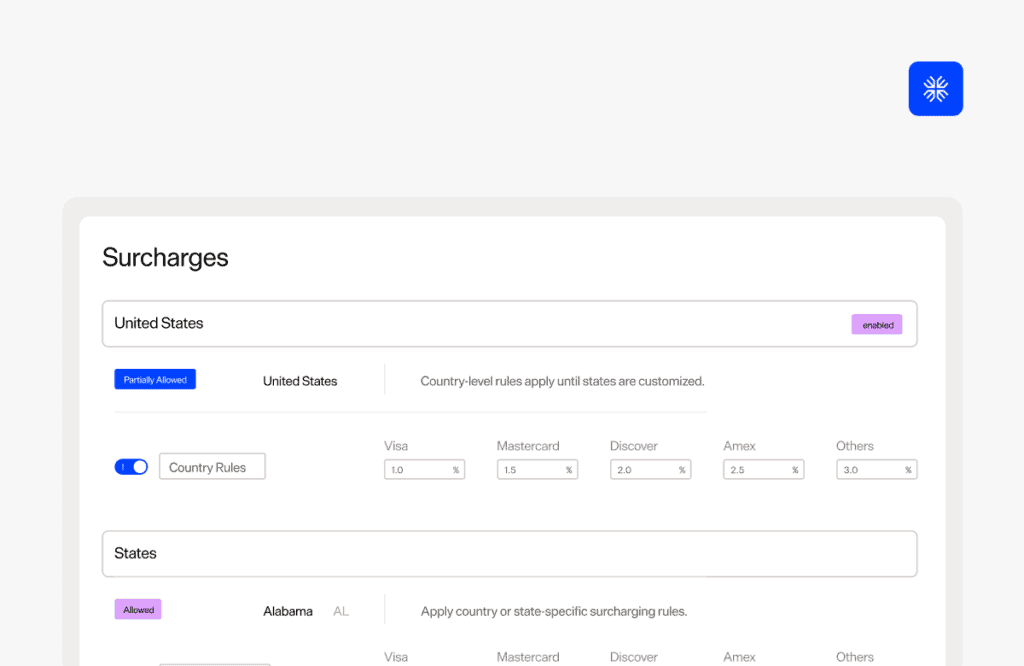
Pass credit card processing costs on to buyers who pay by card. Set the rate at the national, state, or card brand level, and customize the disclosure language buyers see at checkout so the cost is clear before they pay. Calculate your savings
Summary
The August releases reflect a consistent focus: reducing the manual work that accumulates between a closed deal and clean financials. Automation for CPI renewals, reallocation rules, deposit reconciliation, and ACH self-service each remove a step that used to require human intervention. And the new audit trail for closing and lock dates gives finance teams the visibility to move fast at close without losing control.
See what Maxio can do for your team. Get a demo.